Audience: Personnel that used text or voice for MFA
| Issued: 09/04/2026 | Revised: 09/14/2026 |
Overview
To align with Microsoft's increased account security requirements, KCS no longer supports the use of Text(SMS) or Voice calls as a form of MFA. Legacy users with those forms of MFA will need to move to Authenticator App. Completing the Preemptive steps allows you time to complete the process and not have to rush through it before being enforced at the end of 2026.
Frequently Asked Questions about the Microsoft Authenticator app and alternative options can be found at the bottom of this page.
Phased Rollout Schedule
To ease the support needs for this transition and ensure all users move away from these weaker methods of MFA in a predictable manner, KCS IT will move groups in phases through December. Each impacted user will also receive ParentSquare reminders ahead of each group's deadline. All users are encouraged to get ahead of this change by following the preemptive instructions below.
| SMS / Voice users with Last Names starting with: | Enforcement Date to move to Authenticator: |
| A - D | October 20, 2026 |
| E - K | November 10, 2026 |
| L - Q | December 1, 2026 |
| R - Z | December 15, 2026 |
Install Microsoft Authenticator
If you do not have Microsoft Authenticator installed on your phone already, start here by downloading the app (don't worry about logging into the app, just get it installed). Depending on your phone, choose Google or Apple Store.
Google Play Store Apple App Store
Configure MFA
Preemptive
Do these steps while on a computer and having your phone with Microsoft Authenticator installed.
Step 1: Log in to ClassLink

Step 2 : Open Office 365

Step 3 : Security Info & Add sign-in method

Step 4 : Choose Microsoft Authenticator

Step 5 : Scan the QR code

Step 6 : Open Microsoft Authenticator App on Phone
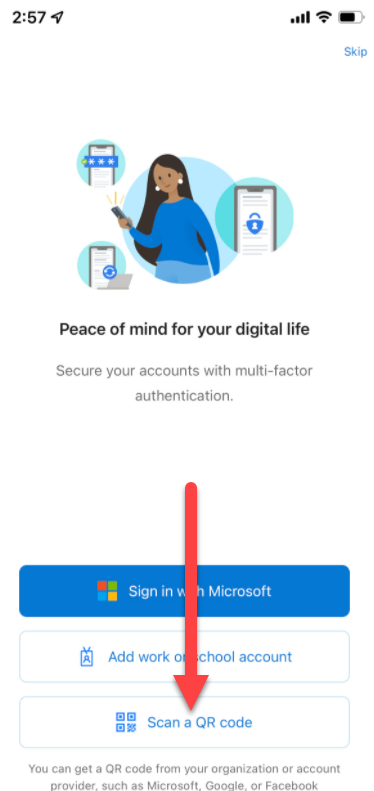
Select Scan a QR code and finish the process.
Forced
Step 1 : Message to Secure Account
Follow the on-screen prompts to set up your Microsoft Authenticator app.


Open the Microsoft Authenticator app is installed on your phone, select Scan a QR code on your phone and finish the process by scanning the QR code on your screen.
Frequently Asked Questions?
What is MFA?
MFA (Multi Factor Authentication) provides an added layer of security to your account. With the first layer - your password - still forming the foundation of your authentication process, MFA enhances that foundation by providing a second, stronger layer by requiring physical access to a second authentication method to prove your identity.

Why do I have to use an app instead of text?
- Text messages travel across public cellular networks and are vulnerable to "SIM-swapping" (where hackers trick phone carriers into transferring your phone number) and interception Cybercriminals can easily steal text message codes to gain unauthorized access to accounts.
- Microsoft is shutting down SMS text logins: Microsoft is permanently retiring SMS and phone call verification for all organizations using Microsoft accounts. Moving to the Microsoft Authenticator app ensures our accounts remain compliant and uninterrupted.
- It works better in school buildings. Text messages often fail or get delayed due to poor cellular reception inside concrete school walls. The Microsoft Authenticator app works instantly over school Wi-Fi or mobile data, making sign-in faster and more reliable.
- It is easier to use. Instead of waiting for a text to arrive and manually typing in a 6-digit code every time, the app lets you approve your sign-in with a quick tap on your phone.
What does the Microsoft Authenticator app give access to?
Privacy & Device Control Facts about Microsoft Authenticator:
- No PersonalData Access: The Microsoft Authenticator app acts only as a secure cryptographic token; it cannot read or share your personal texts, photos, browsing history, or personal data.
- It is Already Your Device: Since you already receive text codes, installing the app does not increase device exposure or change the hardware you use. It simply replaces an insecure text message channel with an encrypted app channel.
- Offline Capability: Authenticator apps generate codes even when your phone has no cellular service or cell signal, making it more reliable when traveling or in dead zones.
What if the Authenticator app doesn't work for me?
We know the Microsoft Authenticator app isn't the right fit for everyone, and we'd like to work with you to find something that is. MFA is required for all KCS accounts, but there is more than one way to meet that requirement.
If you don't have a smartphone, would rather not install work apps on a personal device, or have an accessibility need, please reach out to us and we'll work through the options together. Submit an IIQ ticket under MFA – Alternative Method Request and briefly tell us what's getting in the way. We'll follow up within 2 business days.
Good to know: One common alternative is a FIDO2-certified physical security key. If you already have one or would like to use your own, let us know in your ticket so we can make sure the option appears on your account. You can manage your sign-in methods at https://mysignins.microsoft.com/security-info.

Where can I get assistance?
If you need extra assistance, contact KCS-IT via an IIQ help ticket.